Windows optimization for CS2, Valorant and other games

Maximum FPS.
Zero compromises.

Smart Windows optimization for people who play to win.

Download free

Windows 10 / 1148 hours of full access free, no card

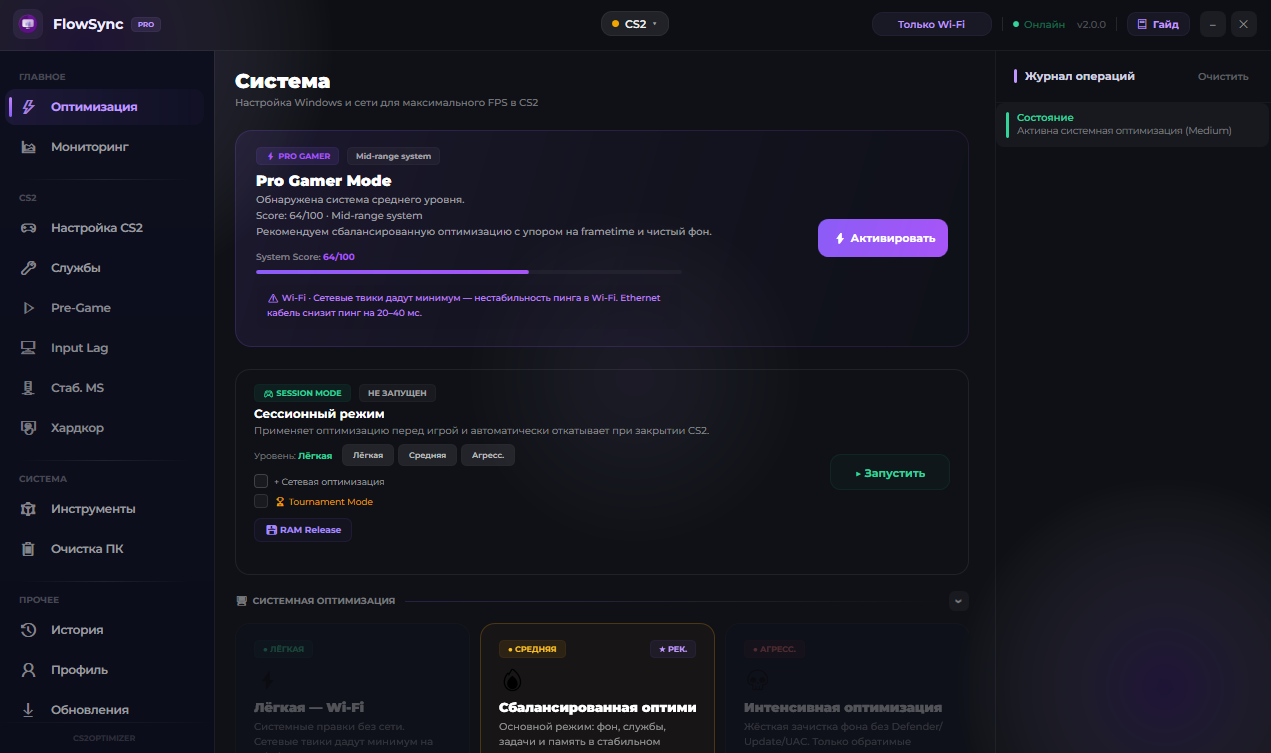
FlowSync interface
Performance

Faster where
the game is won.

More frames. Fewer stutters. Stability in every round — not just in the menu.

Try it free
+47
average FPS gain
100+
smart tweaks
0
bans in 2 years
1
click to roll back
In game

You feel it
in the fight.

Consistently high FPS where there used to be hitches and drops at the worst possible moment.

FPS
before optimization after FlowSync

Illustration: how the frame rate changes after optimization

Results

Real machines.
Real numbers.

Measured on users’ computers. Gains depend on hardware, drivers and in-game settings.

Counter-Strike 2
Dust2 · 1920×1080 · Low
Before
87
After
163
+87%
Ryzen 5 5600X · RTX 3060 12GB · 16GB DDR4
Counter-Strike 2
Mirage · 1920×1080 · Low
Before
145
After
210
+45%
i5-10400F · GTX 1660 Super · 16GB DDR4
Counter-Strike 2
Inferno · 2560×1440 · Med
Before
160
After
220
+37%
i7-8700K · RTX 2070 · 32GB DDR4

FPS gains depend on your PC configuration, game settings and driver version.

Before and after

A difference
you can see.

CS2 on a mid-range PC — Ryzen 5 5600X · RTX 3060. Measured on the Benchmark map.

After · ~159 FPS Before · ~112 FPS
How it works

Four steps.
Not one wasted.

FlowSync doesn’t apply one-size-fits-all settings. First it studies your system — then it acts.

01

Hardware analysis

It scans your CPU, GPU, memory and Windows build. A tweak is applied only if it’s relevant to your exact configuration.

02

Registry snapshot

Before the first change, a full snapshot of the registry and service states is taken. That’s your safety net — the restore point always works.

03

Smart optimization

Selected tweaks are applied from the registry through to Windows services. Every change is logged, progress is visible in real time.

04

Session Mode

Launching the game through Session Mode enables temporary optimizations for the match — and rolls them back on its own the moment you quit.

Interface

Considered
down to the pixel.

Every mode explained in plain language. No visual noise — only what actually moves your FPS.

FlowSync dashboard
Modes

Six tools.
One interface.

From a light cleanup before the match to a full squeeze — turn on only what you need.

Turbo Mode

Permanent deep registry and service tweaks. Applied once, active on every system start.

  • DiagTrack telemetry disabled for good
  • IFEO High I/O and CPU priority for the game
  • Windows Update freeze — optional

Session Mode

Aggressive optimizations for the duration of the match only. Full automatic rollback once you leave the game.

  • Windows Update pauses for the match
  • SearchIndexer stops at launch
  • Services restored after the game

Pre-Game Cleanup

Closes background processes before the match — browsers, updaters, sync clients. Frees memory and takes load off the disk.

  • Edge, Chrome, Discord — configurable
  • Epic Games, OneDrive, SearchIndexer
  • Warns before closing anything important

Hardcore Mode

Maximum squeeze for experienced users and powerful rigs. Enabled deliberately — and reversed just as easily.

  • NIC Large Send Offload v2 disabled
  • CPU C-states, HPET Platform Clock
  • Win32PrioritySeparation, GPU TDR Delay

Service Wizard

A guide to switching off Windows services. It detects your hardware and asks pointed questions — no blanket solutions.

  • Auto-detects Bluetooth, printer, Xbox
  • 38+ services with the pros and cons of each
  • Safe rollback with one button

Stutter Doctor

Finds the source of stutter and freezes. It checks what people usually only learn about on forums — and explains it in plain language.

  • VBS and Hyper-V diagnostics
  • Login screen service check (Windows 11)
  • Thermal throttling detection
Under the hood

Six areas of work
across your system.

100+

CPU and scheduler

Process priorities, timings and core allocation for gaming load. IFEO High I/O, Win32PrioritySeparation, C-states — the foundation of the whole optimization.

Graphics card

GPU scheduler, render priority, TDR Delay.

Memory

Standby cache and RAM cleanup before the match.

Network · Registry · Services

TCP buffers and lower ping, DiagTrack telemetry disabled, NIC Large Send Offload, smart handling of background services.

Session Mode

Full throttle
before the match.

One click a second before the game — and every resource goes into it. When you quit, everything returns on its own.

Session Mode
Why FlowSync

By hand — hours.
Here — two clicks.

By hand
  • Hours of reading forum guides
  • Risk of breaking Windows over a typo
  • Manual rollback through regedit
  • After a Windows update — start over
With FlowSync
  • 2 clicks — everything applies itself
  • Hardware compatibility check
  • Automatic registry snapshot before changes
  • Updated along with the app
Calculator

See your gain.
Before you buy.

Pick your configuration — we’ll show a realistic estimate based on users with similar hardware.

Processor
Graphics card
Is Windows already optimized?
Expected FPS gain
+55–90 FPS
  • Frametime stabilization
  • Lower input lag
  • Maximum effect — Windows is barely optimized
Try it on your PC — free

Estimate based on data from users with similar configurations. Actual gains depend on drivers and game settings.

60 FPS

Entry-level PC

Smooth where it used to tear at 30–40. Games become playable.

144 Hz

Mid-range PC

Steady frames without drops or stutter, even in heavy fights.

240 Hz

High-end PC

Even frametime and minimal latency — built for competitive play.

Full control

One click —
and it’s all back.

A restore point is created automatically. Don’t like the result? Go back instantly.

Security

Reliable.
Reversible.
VAC Safe.

FlowSync only touches Windows system settings. Your game files stay exactly as they were.

Registry snapshot

Before every optimization, a backup of the affected keys is created. You can export it as a .reg file.

Full rollback

One button returns the system to its original state. It works even if you’ve already closed the app.

Game files untouched

No edits to game files, Steam configs or EAC and VAC components. Registry and Windows services only.

VAC Safe

Anti-cheat looks for file tampering and suspicious injection. FlowSync does neither.

Transparent log

Every action is written to a detailed log. You always know exactly what changed.

About antivirus

There is no malicious code. A warning, if it appears, is a false positive caused by registry access. You can verify the file yourself.

Account

More than just a key.

Signing up takes half a minute and costs nothing. In return, your license stops depending on a single file on your drive.

Your key won’t get lost

The license is tied to your account, not your drive. Reinstalled Windows? Just sign in again.

Personal stats

Activity rings, launch history and the list of applied modules — you can see what’s actually working on your system.

Referral program

25% from every purchase made through your link. Credited automatically, withdrawn without hoops.

Payment history

Every purchase and receipt in one place. You can always reopen an invoice.

Telegram linking

Instant key delivery and password recovery through the bot — no support tickets.

Free

An account costs nothing and commits you to nothing. The trial works without one too.

Progress

Use it.
Get more.

Your account has a level. It grows from what you already do: running the app, visiting the site, inviting friends. And the level unlocks what you cannot get any other way.

A second key

At level ten — a second licence for a second computer. Laptop and desktop under one account.

Answered first

From level five your support requests are marked priority and move to the top of the queue.

Your own look

Frames, name gradients, and badges unlock with levels — and everyone sees them on the leaderboard.

Open your progress
Pricing

Try it first.
Then decide.

48 hours with everything included, free. Like it? One key forever, no subscription.

Free trial
$0
48 hours · no card, no sign-up
  • Every feature, no limits
  • See the gain on your own PC
  • Not for you? Roll back with one button
  • One trial per computer
Download free
Lowest price yet
$9.99$3.99
one-time payment · license forever
  • 100+ smart tweaks
  • All modes: Turbo, Session, Hardcore
  • Service Wizard and Stutter Doctor
  • Full rollback and registry snapshot
  • All future updates
  • 24/7 support on Telegram

License key

Purchase through the Telegram bot: card or crypto. The key arrives instantly and binds to one PC for good.

The price goes up

Every major update raises the price. A license you have already bought stays yours at the old one.

48 hours free

Full functionality, no limits. Not for you? Roll the changes back with one button and uninstall. No risk.

FAQ

The short answers.

Is this safe for my system?
Yes. Only proven, reversible changes are applied. A registry snapshot is taken before any optimization, and everything can be rolled back in one click at any time. System files are never modified — only registry keys and Windows service states.
Will I get banned in CS2, Valorant or Faceit?
No. FlowSync works at the Windows level, doesn’t touch game processes and doesn’t inject code. VAC, Vanguard and EAC don’t react to it — there is simply nothing for them to flag.
Is there a free version?
There is a free trial: 48 hours of full functionality, no bank card and no mandatory sign-up. It is tied to your hardware — one trial per computer. After that the app works with a PRO key for $3.99, a one-time payment with no subscription. Everything the app set up during the trial stays in place.
Is the FPS gain guaranteed?
It depends on your configuration. Where Windows hasn’t been optimized, the improvement is immediate. On already well-tuned systems you’ll gain fewer frames, but you’ll gain frametime stability and lower input lag. The 48-hour trial lets you check on your own PC before buying.
My antivirus complains — is that normal?
Yes, it’s a false positive. Antivirus software reacts to programs that work with the Windows registry — standard behaviour. There is no malicious code; you can check the file on VirusTotal yourself and add it to exclusions.
How do I undo everything?
Open FlowSync → the “Rollback” tab → “Restore original settings”. It takes 10–30 seconds, and the registry, services and network stack return to their state before the first run. The snapshot is stored locally and isn’t deleted automatically.
What is Session Mode and why do I need it?
It’s a mode where extra optimizations live only for the duration of a gaming session. It lets you apply tweaks that would be inconvenient day to day — pausing background updates, for instance, or giving the game maximum CPU priority. Once you close CS2, everything returns to normal automatically.
Do I need to restart?
Some tweaks apply immediately, others need a restart. The app clearly marks which is which. Session Mode works without one.
Does it work on a laptop?
Yes. The app detects your device type and won’t offer desktop power tweaks on a laptop. Keep in mind that aggressive modes can raise temperatures — it’s better to run them plugged in.

All answers in the knowledge base

More on the site

Everything you need,
in one place.

Mini-game

Kill the processes.
Feel the difference.

Thirty seconds to switch off by hand what eats your FPS. FlowSync does it in one tap.

60FPS
30seconds

Tap the processes — each one is stealing frames

Your PC is ready
for more.

Download FlowSync and feel the difference in your next match.